| Title: | Create and Install Custom 'RStudio' Themes |
| Version: | 1.2.0 |
| Description: | Create, convert and install custom 'RStudio' editor themes from 'Visual Studio Code', 'Positron' and 'TextMate' theme files. Convert themes between 'TextMate', 'Visual Studio Code' and 'Positron' formats and install bundled ports of popular themes for use in 'RStudio'. Inspect theme files as tabular data for custom conversion workflows. |
| License: | MIT + file LICENSE |
| URL: | https://dieghernan.github.io/rstudiothemes/, https://github.com/dieghernan/rstudiothemes |
| BugReports: | https://github.com/dieghernan/rstudiothemes/issues |
| Depends: | R (≥ 4.1.0) |
| Imports: | cli, colorspace, dplyr, grDevices, jsonlite, rstudioapi, sass, tidyr, tools, utils, xml2 |
| Suggests: | knitr, quarto, testthat (≥ 3.0.0), withr |
| VignetteBuilder: | quarto |
| Config/Needs/coverage: | covr |
| Config/Needs/website: | dieghernan/gitdevr, ragg, styler, gadenbuie/rsthemes |
| Config/roxygen2/markdown: | TRUE |
| Config/roxygen2/version: | 8.1.0 |
| Config/testthat/edition: | 3 |
| Config/testthat/parallel: | true |
| Copyright: | See file inst/COPYRIGHTS. |
| Encoding: | UTF-8 |
| X-schema.org-keywords: | r-package, rstudio-themes, textmate-themes, vscode-themes, positron-themes, cran, cran-r |
| NeedsCompilation: | no |
| Packaged: | 2026-08-28 13:07:03 UTC; diego |
| Author: | Diego Hernangómez  [aut, cre, cph],
Garrick Aden-Buie [cph] (for the rsthemes::try_rsthemes() function)
[aut, cre, cph],
Garrick Aden-Buie [cph] (for the rsthemes::try_rsthemes() function) |
| Maintainer: | Diego Hernangómez <diego.hernangomezherrero@gmail.com> |
| Repository: | CRAN |
| Date/Publication: | 2026-08-28 15:40:02 UTC |
rstudiothemes: Create and Install Custom 'RStudio' Themes
Description

Create, convert and install custom 'RStudio' editor themes from 'Visual Studio Code', 'Positron' and 'TextMate' theme files. Convert themes between 'TextMate', 'Visual Studio Code' and 'Positron' formats and install bundled ports of popular themes for use in 'RStudio'. Inspect theme files as tabular data for custom conversion workflows.
Author(s)
Maintainer: Diego Hernangómez diego.hernangomezherrero@gmail.com (ORCID) [copyright holder]
Authors:
Diego Hernangómez diego.hernangomezherrero@gmail.com (ORCID) [copyright holder]
Other contributors:
Garrick Aden-Buie garrick@adenbuie.com (for the rsthemes::try_rsthemes() function) [copyright holder]
See Also
Useful links:
Report bugs at https://github.com/dieghernan/rstudiothemes/issues
Convert a TextMate theme file to Visual Studio Code or Positron
Description
Convert a .tmTheme file representing a TextMate theme and write the
equivalent Visual Studio Code theme file (.json).
convert_tm_to_positron_theme() is an alias for
convert_tm_to_vs_theme().
Usage
convert_tm_to_vs_theme(
  path,
  outfile = tempfile(fileext = ".json"),
  name = NULL,
  author = NULL
)

convert_tm_to_positron_theme(
  path,
  outfile = tempfile(fileext = ".json"),
  name = NULL,
  author = NULL
)
Arguments
path |
Path or URL to a TextMate theme file in |
outfile |
Path where the resulting file will be written. Defaults to
a temporary file created with |
name |
Theme name. If |
author |
Theme author. If |
Value
This function is called for its side effects. It writes a .json theme file
to outfile and returns the path.
See Also
read_tm_theme() to inspect the input theme and read_vs_theme()
to inspect the converted theme.
Theme file converters:
convert_to_rstudio_theme(),
convert_vs_to_tm_theme()
Examples
tmtheme <- system.file("ext/test.tmTheme",
  package = "rstudiothemes"
)
path <- convert_tm_to_vs_theme(tmtheme)

readLines(path) |>
  head(50) |>
  cat(sep = "\n")
Convert a theme file to RStudio
Description
Convert a .tmTheme or .json file that defines a TextMate or
Visual Studio Code theme and write the equivalent RStudio .rstheme
file.
Optionally, the generated theme can be installed and applied to the RStudio IDE.
Important: This function only works in RStudio. It returns NULL
when called from other IDEs.
Usage
convert_to_rstudio_theme(
  path,
  outfile = tempfile(fileext = ".rstheme"),
  name = NULL,
  use_italics = TRUE,
  output_style = "expanded",
  force = FALSE,
  apply = FALSE
)
Arguments
path |
Path or URL to a TextMate theme file ( |
outfile |
Path where the resulting file will be written. Defaults to
a temporary file created with |
name |
Theme name. If |
use_italics |
Logical. Use italics in the resulting theme. Defaults to
|
output_style |
Bracketing and formatting style of the CSS output.
Possible styles: |
force |
Whether to force the operation and overwrite an existing file
with the same name. |
apply |
Logical. Apply the theme with |
Details
RStudio supports custom editor themes in two formats, .tmTheme and
.rstheme. The .tmTheme format originated with TextMate and has become
a common theme format. This tmTheme editor hosts a large collection of
.tmTheme files. The .rstheme format is specific to RStudio.
To switch editor themes, go to Tools > Global Options > Appearance > Add
and use the editor theme selector.
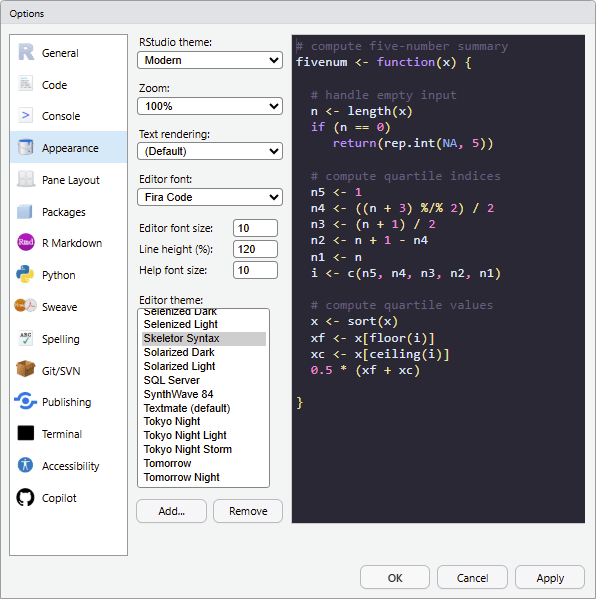
For more information, see https://docs.posit.co/ide/user/ide/guide/ui/appearance.html.
Value
This function is called for its side effects. It writes a .rstheme file to
outfile and returns the path. If force or apply is TRUE, it installs
the theme. If apply is TRUE, it also applies the theme to your
RStudio IDE.
See Also
-
read_vs_theme()andread_tm_theme()to inspect input theme files. -
install_rstudiothemes()to install bundled themes. -
rstudioapi::addTheme()andrstudioapi::applyTheme()to install or apply an RStudio theme directly.
Theme file converters:
convert_tm_to_vs_theme(),
convert_vs_to_tm_theme()
Examples
if (on_rstudio() && interactive()) {
  vstheme <- system.file("ext/skeletor-syntax-color-theme.json",
    package = "rstudiothemes"
  )

  # Apply the theme for 10 seconds to demonstrate the effect.
  current_theme <- rstudioapi::getThemeInfo()$editor

  # Print the current theme name.
  current_theme
  convert_to_rstudio_theme(vstheme,
    name = "A testing theme",
    apply = TRUE, force = TRUE
  )

  Sys.sleep(10)

  rstudioapi::applyTheme(current_theme)
  rstudioapi::removeTheme("A testing theme")
}
Convert a Visual Studio Code or Positron theme file to TextMate
Description
Convert a .json file representing a Visual Studio Code or Positron
theme and write the equivalent TextMate theme file (.tmTheme).
convert_positron_to_tm_theme() is an alias for
convert_vs_to_tm_theme().
Usage
convert_vs_to_tm_theme(
  path,
  outfile = tempfile(fileext = ".tmTheme"),
  name = NULL,
  author = NULL
)

convert_positron_to_tm_theme(
  path,
  outfile = tempfile(fileext = ".tmTheme"),
  name = NULL,
  author = NULL
)
Arguments
path |
Path or URL to a Visual Studio Code or Positron theme
file in |
outfile |
Path where the resulting file will be written. Defaults to
a temporary file created with |
name |
Theme name. If |
author |
Theme author. If |
Value
This function is called for its side effects. It writes a .tmTheme file to
outfile and returns the file path.
See Also
read_vs_theme() to inspect the input theme and read_tm_theme()
to inspect the converted theme.
Theme file converters:
convert_tm_to_vs_theme(),
convert_to_rstudio_theme()
Examples
vstheme <- system.file("ext/test-simple-color-theme.json",
  package = "rstudiothemes"
)
path <- convert_vs_to_tm_theme(vstheme)

readLines(path) |>
  head(50) |>
  cat(sep = "\n")
Generate random UUIDs
Description
Generate version 4 pseudo-random Universally Unique Identifiers (UUIDs).
Usage
generate_uuid(hint = NULL)
Arguments
hint |
Optional character string or object coercible with
|
Details
This helper generates a UUID to identify generated theme versions.
Value
A character string representing a valid UUID.
Source
Adapted from an unreleased version of uuid() from
ids.
References
Davis KR, Peabody B and Leach P (2024). "Universally Unique Identifiers (UUIDs)." RFC 9562. doi:10.17487/RFC9562, https://www.rfc-editor.org/info/rfc9562.
See Also
Package helpers:
on_rstudio()
Examples
# Random UUID.
generate_uuid()

generate_uuid()

# Persistent UUID with `hint`.
hint <- "something as seed"

generate_uuid(hint)

generate_uuid(hint)
Check whether the session is running in RStudio
Description
Detect whether the current R session is running in RStudio to decide whether themes can be applied to the IDE.
Usage
on_rstudio()
Value
TRUE if running in RStudio, FALSE otherwise.
See Also
Package helpers:
generate_uuid()
Examples
on_rstudio()
Read and parse a TextMate theme file
Description
Read a .tmTheme XML file representing a TextMate or Sublime Text
theme.
Usage
read_tm_theme(path)
Arguments
path |
Path or URL to a TextMate theme file in |
Value
A tibble containing the theme data.
See Also
convert_tm_to_vs_theme() and convert_to_rstudio_theme() to
convert TextMate themes.
Theme file readers:
read_vs_theme()
Examples
the_theme <- system.file("ext/test-color-theme.json",
  package = "rstudiothemes"
) |>
  # Convert the Visual Studio Code theme to TextMate format.
  convert_vs_to_tm_theme()

# Check the converted theme.
readLines(the_theme) |>
  head(10) |>
  cat(sep = "\n")

read_tm_theme(the_theme)
Read and parse a Visual Studio Code or Positron theme file
Description
Read a .json file representing a Visual Studio Code or Positron
theme.
read_positron_theme() is an alias for read_vs_theme().
Usage
read_vs_theme(path)

read_positron_theme(path)
Arguments
path |
Path or URL to a Visual Studio Code or Positron theme
file in |
Value
A tibble containing the theme data.
See Also
convert_vs_to_tm_theme() and convert_to_rstudio_theme() to
convert Visual Studio Code or Positron themes.
Theme file readers:
read_tm_theme()
Examples
vstheme <- system.file("ext/test-color-theme.json",
  package = "rstudiothemes"
)
read_vs_theme(vstheme)
Manage RStudio themes
Description
Install, list, preview or remove the RStudio themes included in rstudiothemes. These functions are adapted from selected rsthemes functions. MIT License Copyright © rsthemes authors.
Important: These functions only work in RStudio and return NULL
when called from other IDEs. The exception is
list_rstudiothemes(list_installed = FALSE).
Usage
install_rstudiothemes(
  style = c("all", "dark", "light"),
  themes = NULL,
  destdir = NULL
)

remove_rstudiothemes(style = c("all", "dark", "light"))

list_rstudiothemes(style = c("all", "dark", "light"), list_installed = TRUE)

try_rstudiothemes(style = c("all", "dark", "light"), themes = NULL, delay = 0)
Arguments
style |
Theme group: |
themes |
Optional character vector of theme names. If provided, only
these themes are used and |
destdir |
Optional directory for |
list_installed |
If |
delay |
Number of seconds to wait between themes. Set to 0 to be prompted to continue after each theme. |
Value
install_rstudiothemes() and remove_rstudiothemes() return NULL
invisibly.
list_rstudiothemes() returns a character vector of theme names.
try_rstudiothemes() has side effects. It cycles through bundled themes,
lets you preview each one and restores your original theme when you quit.
Functions
-
install_rstudiothemes()installs bundled themes. -
remove_rstudiothemes()removes bundled themes. -
list_rstudiothemes()lists installed or available themes. -
try_rstudiothemes()previews bundled themes.
Bundled themes
rstudiothemes includes RStudio themes based on the following editor themes:
Andromeda Theme by Eliver Lara (MIT License).
Ayu Theme by teabyii (MIT License).
-
Barbie Theme by Milene Toazza (MIT License).
-
Bluloco Light Theme by Umut Topuzoglu (GNU Lesser General Public License version 3).
Catppuccin Theme by Catppuccin (MIT License).
Cobalt2 Theme by Wes Bos (MIT License).
CRAN Theme by dieghernan, based on the CRAN (R Project) website theme created with Pandoc (MIT License).
Dracula Theme by Dracula (MIT License).
GitHub Dark and Light Themes by GitHub (MIT License).
JellyFish Theme by Pawel Borkar (Apache License 2.0).
Matcha Theme by Luca Falasco (MIT License).
Matrix Theme by UstymUkhman (MIT License).
Night Owl Dark and Light Themes (no italics) by Sarah Drasner (MIT License).
Nord Theme by Arctic Ice Studio (MIT License).
OKSolar Theme by dieghernan (MIT License).
One Dark Pro Theme by binaryify (MIT License).
Overflow Theme by dieghernan (MIT License).
Panda Theme by Panda Theme (no license declared).
Positron Dark and Light Themes by dieghernan, inspired by the Positron IDE (MIT License).
Selenized Themes by dieghernan (MIT License).
Skeletor Syntax Theme by dieghernan (MIT License).
SynthWave '84 Theme by Robb Owen (MIT License).
Tokyo Night Theme by Enkia (MIT License).
Visual Studio Code Dark and Light Themes by Microsoft (MIT License).
Winter is Coming Theme by John Papa (MIT License).
Author(s)
Garrick Aden-Buie https://github.com/gadenbuie
References
Aden-Buie G (2026). rsthemes: Full Themes for RStudio v1.2+. rsthemes version 0.5.1, commit 48fc078f772e5e63669bc9773eabc8e9cdc7f699, https://github.com/gadenbuie/rsthemes.
See Also
convert_to_rstudio_theme() to convert and install a custom theme
file.
Examples
list_rstudiothemes(list_installed = FALSE)